This website uses cookies to improve your experience. We'll assume you're ok with this, but you can opt-out if you wish.Accept
Privacy Overview
This website uses cookies to improve your experience while you navigate through the website. Out of these, the cookies that are categorized as necessary are stored on your browser as they are essential for the working of basic functionalities of the website. We also use third-party cookies that help us analyze and understand how you use this website. These cookies will be stored in your browser only with your consent. You also have the option to opt-out of these cookies. But opting out of some of these cookies may affect your browsing experience.
Necessary cookies are absolutely essential for the website to function properly. This category only includes cookies that ensures basic functionalities and security features of the website. These cookies do not store any personal information.
Any cookies that may not be particularly necessary for the website to function and is used specifically to collect user personal data via analytics, ads, other embedded contents are termed as non-necessary cookies. It is mandatory to procure user consent prior to running these cookies on your website.
some have
claimed high scores of nearly 400 metres, while one proclaimed 724 metres !
You almost get the feeling that real taxi drivers don't have to take a
proper test - they just have a go on this for the afternoon before being let
loose on the roads.
Graphics, Sound and Playability
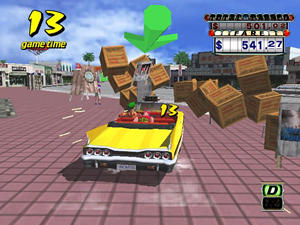
Fast, furious, colourful, fun and absolutely gorgeous. That's the best
way I can describe the graphics in Crazy Taxi, which is the first
Dreamcast game I've played. As you drive about the speed of the game is
mind-blowing and it runs like lightning. There's some very slight pop-up
as you drive along and something rather odd happening when you see future
customers walking through cars or other solid objects to get you, but there's
nothing to compare, when you drive down very steep streets (say that quickly
after a few pints) while playing on a 32" widescreen TV, to give that perfect
stomach-churning effect of feeling in danger.
The sound is the only let-down in this game, although sonic effects were
never a driving game's strongest point. The rock music is loud and energetic,
but repetitive, there's the usual rev of the engine - albeit useful when
determining if a "Crazy Dash" has worked, while the dialogue is basic with
customers shouting at you when you get it wrong and miss their time limit,
or complimenting you when you do your job properly and one of the male
passengers sounds like Beavis and Butthead's elderly next-door neighbour.
The handling of the car takes a little while to get used to and I find it's
easier to perform tight turns by using the D-pad and not the analogue joystick,
so tend to use that throughout most of the game. There's also special moves
to consider such as the aforementioned Crazy Dash and Limit Cut which will
take some time to perfect. At times, if you get involved in a crash it's
not always easy to tear your way out of it if there are several cars involved
and the time continues to tick down...
Hints and Tips
A personal tip I have: when you drop someone off, as the camera spins around,
try to spot another fare waiting to be picked up.
Thanks to The Great Cthulhu from uk.games.video.dreamcast for
his advice on Crazy Dashes and Limit Cuts :
When you start before you accelerate,put the car into R then straight into D
and accelerate if you get a fast start (no wheelspin) that's a Crazy Dash (CD)
(the engine pitch goes up real high). Use the same principle when you are
moving, it works easier when you are moving at speed.
Let go of Accelerate, shift into R, straight back into D then floor the
accelerator. Make sure your finger is completely off the accelerator when you
shift from D to R and back to D, it's really all in the timing.
Practice doing them from a dead stop then you'll know if it's working or not
and you'll get used to the engine noise that you should be hearing.
A Limit Cut is a CD straight after a CD, you need to do the second (or
third, fourth etc) CD just before the previous CD winds down, once again you
need to learn what noise the engine makes.
This should be all you need to know,it's basically a matter of timing, then
practice, practice, practice...........
Thanks to Jools Moore from Powerhouse PR
for the following cheats :
'+' Means to 'Press'
'-' Means to 'Release'
'++' Means to 'Press & Hold'
Enter these cheats during the character selection screen.
ANOTHER DAY MODE: (car starts in a different position, music is different too)
Press R trigger once at the character select screen, then release.
Press R trigger again and while pressing the R trigger, press A button.
+R, -R, ++R & A
SECRET BIKE MODE
Press L and R triggers together at the character select screen. Then
release L first then R.
Then press L and R triggers again and then release L and R together.
L & R, -L, -R, L & R, -L & -R (then press A to continue)
ANOTHER DAY & SECRET BIKE MODE
Enter in the Secret Bike mode code, then add:
Press and hold R trigger while selecting with A button.
L & R, -L, -R, L & R, -L & -R, ++R & A
Enter these cheats in just before the character select screen of Arcade
and Original modes
NO DESTINATION MARKERS
Press and hold L and Start buttons together on the Mode Selection screen,
press A button to enter. Keep holding L and Start buttons until after the
Character select screen.
++ L & ++ Start Button, - L & - Start button (After Character select
screen)
NO ARROWS DURING GAMEPLAY FOR NAVIGATION
Press and hold R and Start buttons together on the Mode Selection screen,
press A button to enter. Keep holding R and Start buttons until after the
Character select screen.
++ R & ++ Start Button, - R & - Start button (After Character select
screen)
NO DESTINATION MARKS OR DIRECTIONAL ARROWS FOR NAVIGATION
Press and hold R, L and Start buttons together on the Mode Selection screen,
press A button to enter. Keep holding R, L and Start buttons until after
the Character select screen.
++ R, ++ L & ++ Start Button, - R, - L & - Start button (After Character
select screen)
VIEW CHANGE
You can change to 2 new views by connecting a controller to port C and
pressing the Start button. Then press the Y or B buttons to select the new
view. Then plug the controller back into port A and press the Start button.
You can now play in the new view! It is a lot easier if you have a second
controller in port C so you can change when you want without having to
constantly swap ports!
Overall
If I had any suggestions for the sequel, I'd ask for improved physics around
the town. I loved Microsoft's Midtown Madness (that's the last time
you'll hear me praise anything from the Gatester) and what Crazy Taxi needs
is actual damage caused to the cars when you hit them and the ability to
cause a pile up on the interstate whenever you feel like it. However, they
just flip over without a scratch and you can carry on along your merry,
destructive way... but then this is not a work of strategy, but an out-and-out
arcade game and a very good one at that.
I'd also like to see a level end. You just race around the same town and I'd
like to see different locations from around the world.
If you're after some more info on Crazy Taxi, you can check
out the official Website at
www.crazytaxi.com
GRAPHICS SOUND EFFECTS AND MUSIC PLAYABILITY ORIGINALITY ENJOYMENT
This website uses cookies to improve your experience. We'll assume you're ok with this, but you can opt-out if you wish.Accept
Privacy Overview
This website uses cookies to improve your experience while you navigate through the website. Out of these, the cookies that are categorized as necessary are stored on your browser as they are essential for the working of basic functionalities of the website. We also use third-party cookies that help us analyze and understand how you use this website. These cookies will be stored in your browser only with your consent. You also have the option to opt-out of these cookies. But opting out of some of these cookies may affect your browsing experience.
Necessary cookies are absolutely essential for the website to function properly. This category only includes cookies that ensures basic functionalities and security features of the website. These cookies do not store any personal information.
Any cookies that may not be particularly necessary for the website to function and is used specifically to collect user personal data via analytics, ads, other embedded contents are termed as non-necessary cookies. It is mandatory to procure user consent prior to running these cookies on your website.




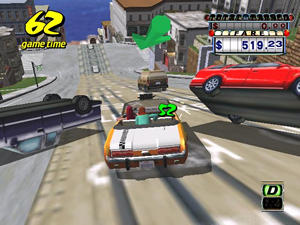 Crazy Taxi
is an arcade racer that began life in that very dwelling.
The premise is simple: drive around town, pick up fares, drop them off,
then move onto the next unsuspecting punter. Each time they have a time
limit. The sooner you arrive, the more cash you'll score. Some people will
also pay more than others.
Crazy Taxi
is an arcade racer that began life in that very dwelling.
The premise is simple: drive around town, pick up fares, drop them off,
then move onto the next unsuspecting punter. Each time they have a time
limit. The sooner you arrive, the more cash you'll score. Some people will
also pay more than others.